
ChargeOS — The open EV charging platform.
One system for drivers, network operations, customer support and finance. Drivers find a station, reserve a plug, scan to charge and pay from a prepaid wallet, in a phone app that installs from the browser. The operator’s own team watches the fleet, clears alarms, commands chargers remotely and brings new hardware online, and every session posts to a double-entry ledger. It works with any OCPP 1.6-J or 2.0.1 charger, AC or DC, from any vendor.
What is ChargeOS?
ChargeOS runs a public charging network end to end, from the driver’s phone to the finance ledger. One system for drivers, network operations, customer support and finance. Drivers find a station, reserve a plug, scan to charge and pay from a prepaid wallet, in a phone app that installs from the browser. The operator’s own team watches the fleet, clears alarms, commands chargers remotely and brings new hardware online, and every session posts to a double-entry ledger. It works with any OCPP 1.6-J or 2.0.1 charger, AC or DC, from any vendor.
Who is ChargeOS for?
Companies that own or operate public EV charging: charge-point operators, fuel retailers, malls and property owners, fleets and utilities. One platform, three audiences — each gets its own workspace, and everyone works from the same live data.
For drivers
A phone app that installs from the browser. Find a station, reserve a plug, scan to charge and pay from a prepaid wallet.
For operations
Live fleet view, alarms, remote commands, maintenance tickets and charger onboarding the network operations team runs on its own.
For the business
Tariffs, a double-entry ledger, dispute handling, executive dashboards and role-based access for every team.
What does a driver see?
Find, reserve, charge and pay, from one screen in the driver’s pocket. There is nothing to download: it opens in the phone’s browser, and registration takes under a minute. Guests can charge without an account through walk-up checkout.
Nearest station first
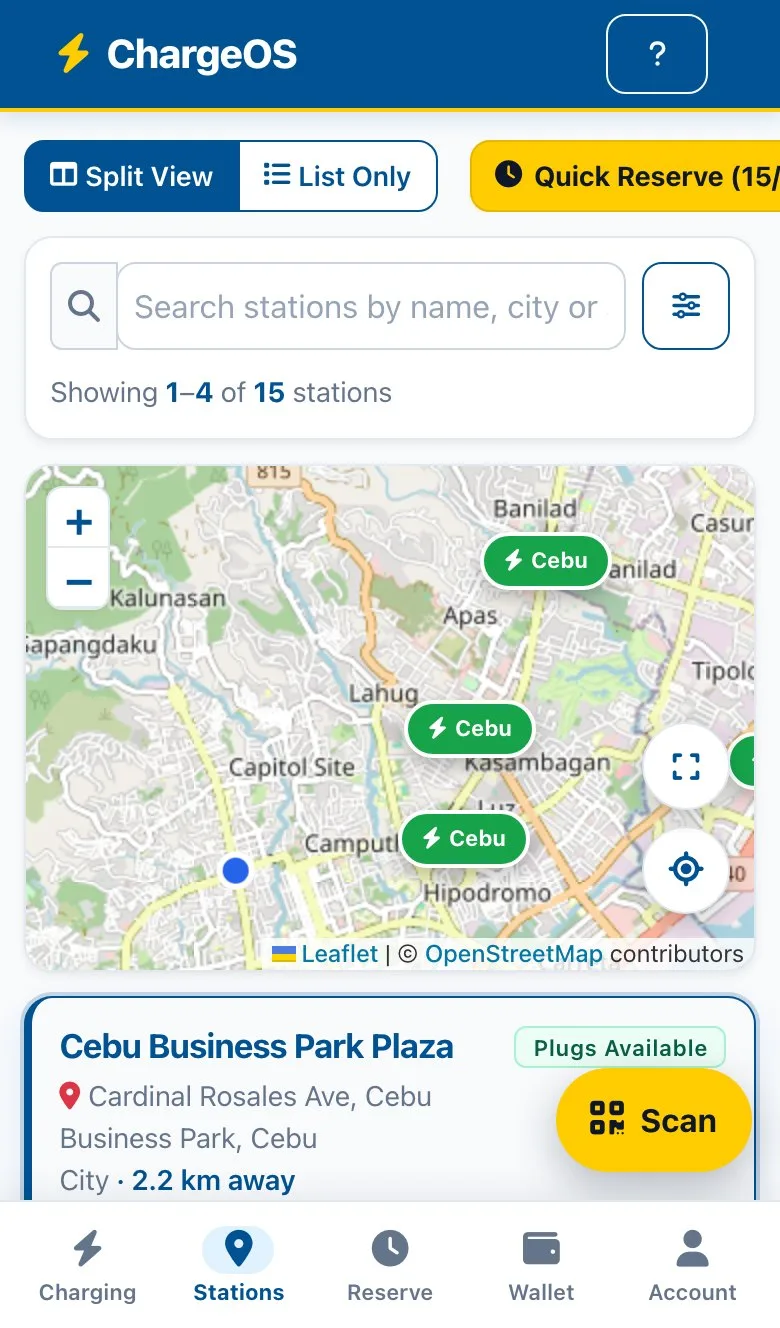
The map opens on the driver’s location and lists stations by distance, with live plug availability and the price per kilowatt-hour.
Guaranteed reservations
Hold a connector for 15 or 30 minutes, with a live countdown until the driver arrives.
Prepaid wallet
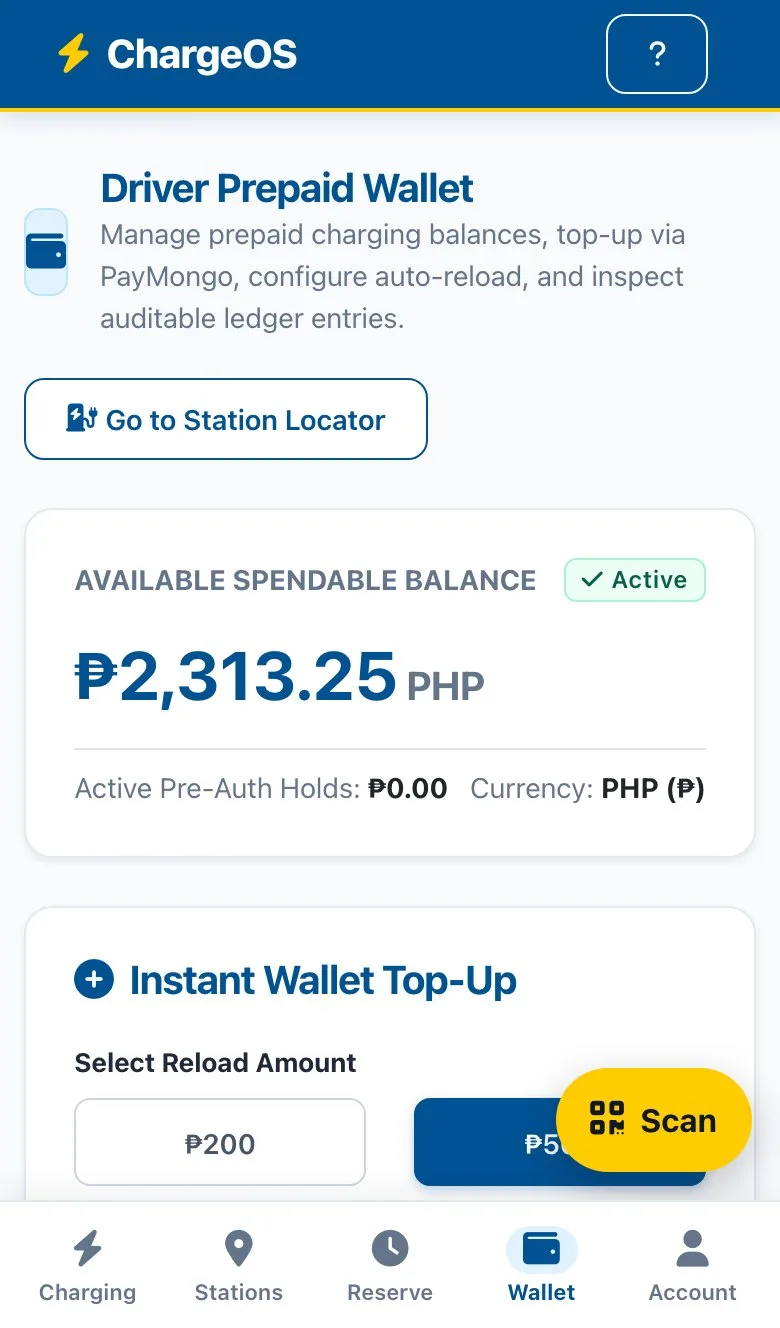
Top up by GCash, Maya or card. Auto-reload keeps the balance ready.
Scan the charger
A QR sticker on each connector opens the right charger. No typing and no searching.
Watch it live
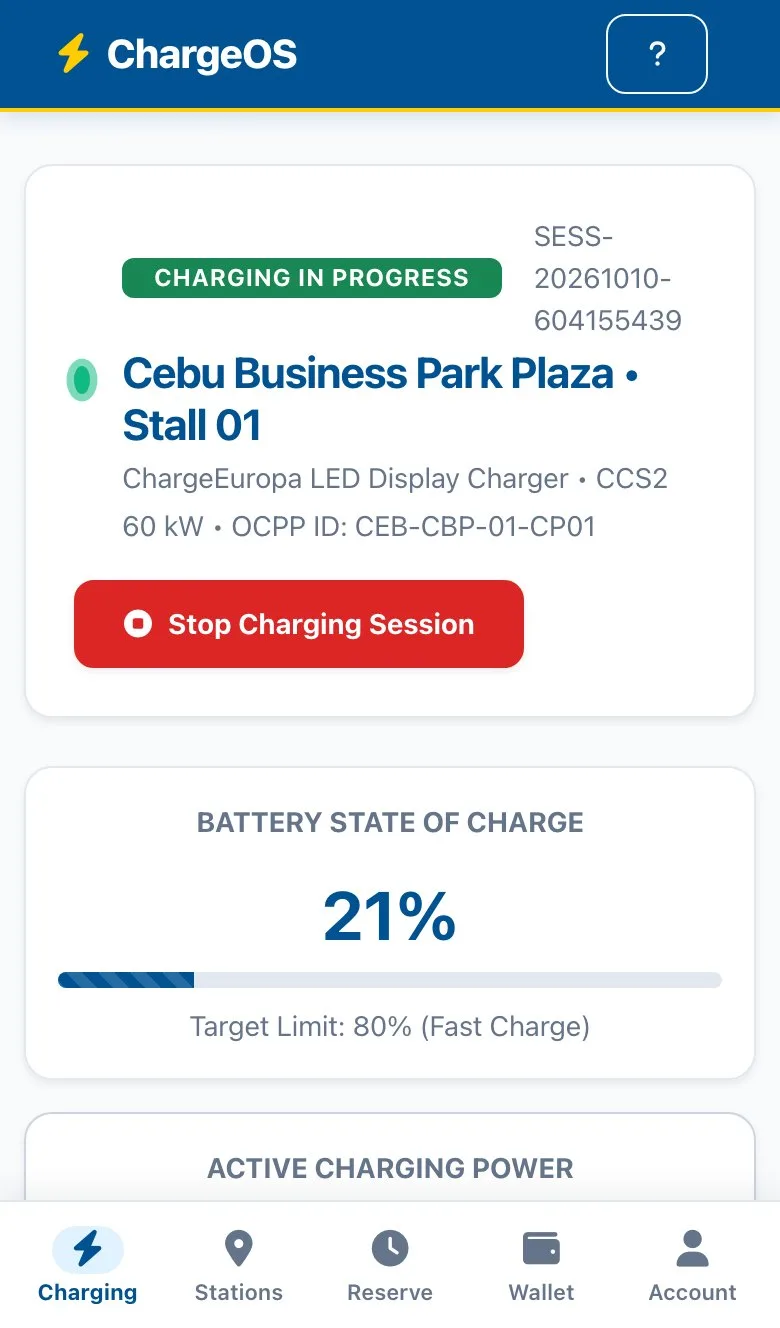
Battery level, power, energy delivered and running cost update every few seconds.
A clear receipt
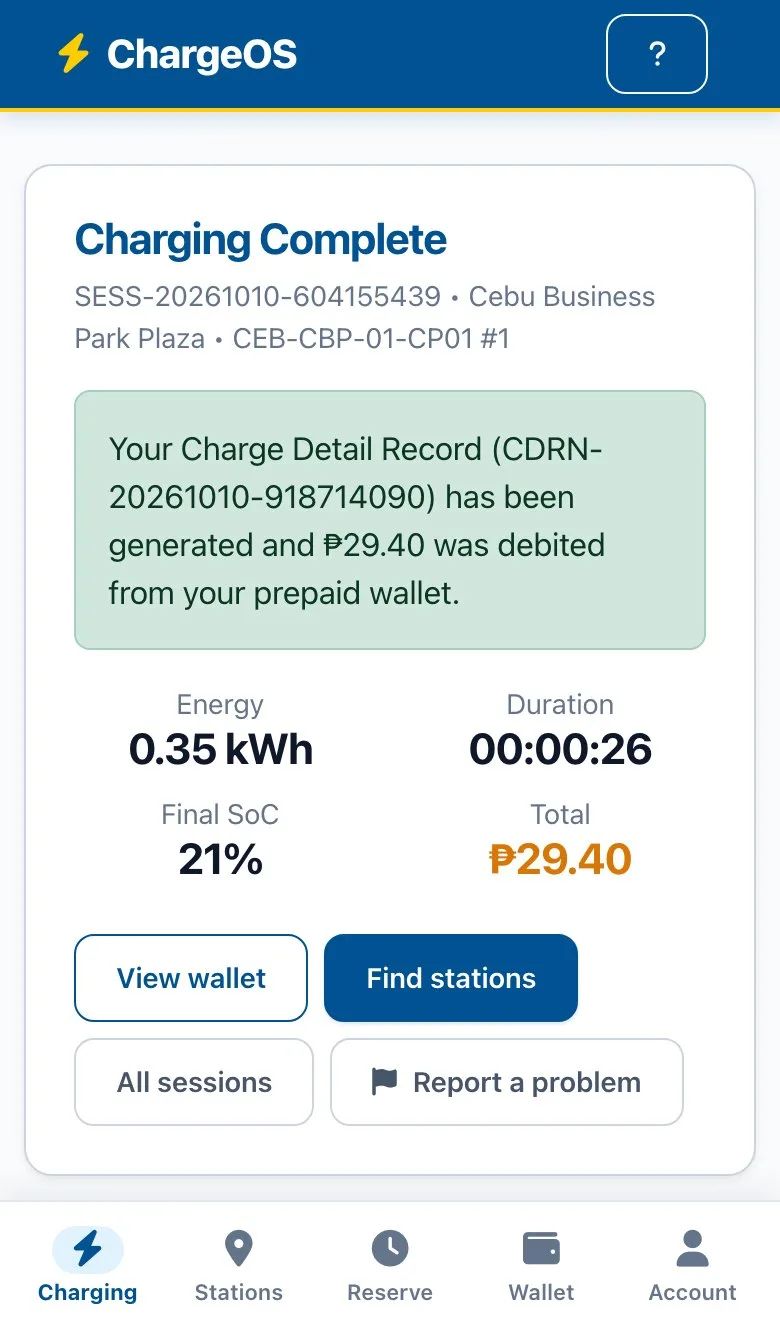
An itemised bill with energy, fees and VAT. A problem can be reported from the receipt.
Find. Reserve. Charge. Pay.
The driver’s side, on a phone: finding the nearest free charger, signing up, reserving a connector, topping up the wallet, scanning to start, watching the session live and getting an itemised receipt. Recorded on the live demo you can open above.
How does the operator run the network?
From one screen that shows what is online, what is charging and what needs attention. Most problems never need a site visit, and new hardware is brought online by the operator’s own team, with no vendor or developer involved.
The whole fleet on one screen
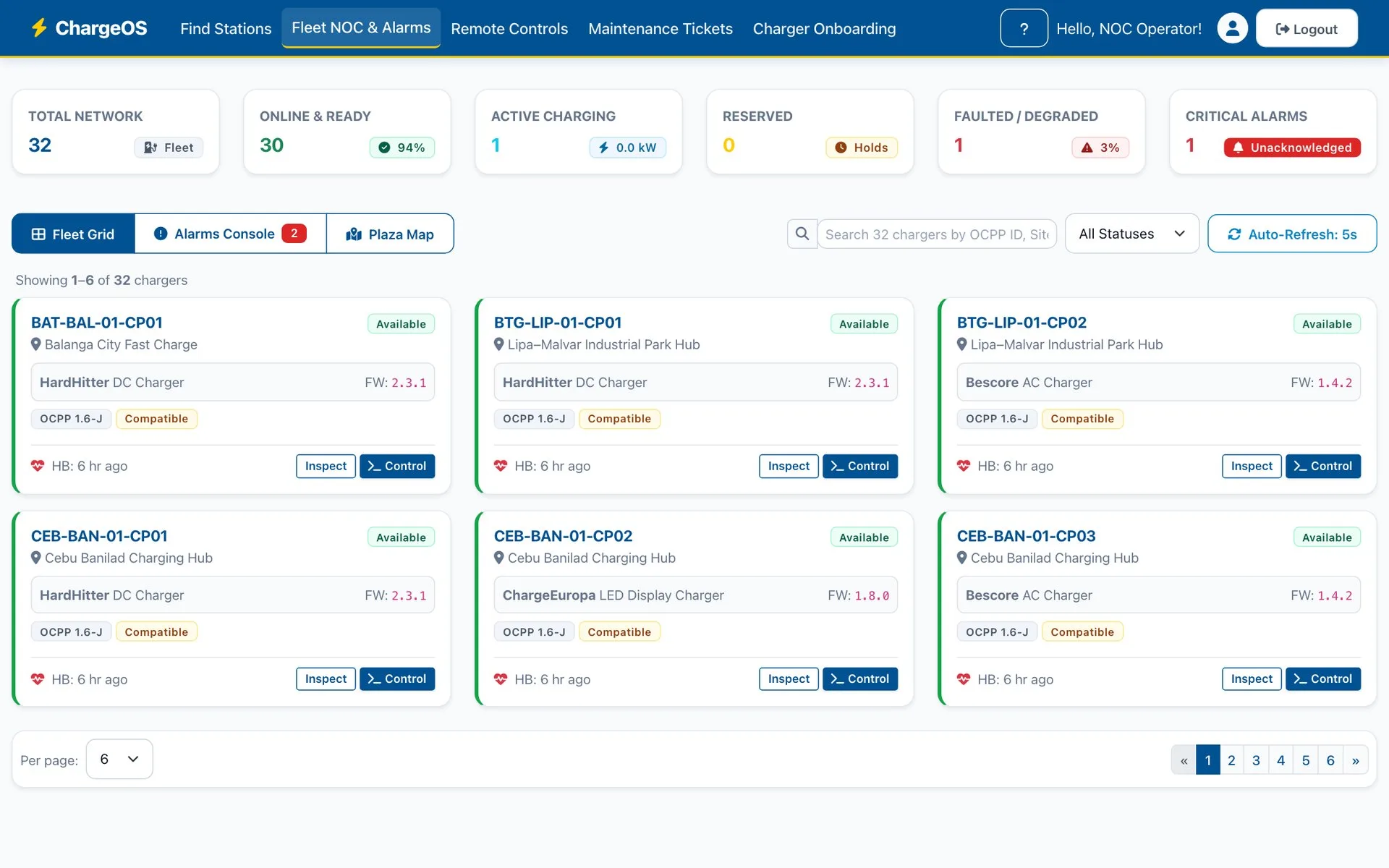
Every charger shows availability, firmware, heartbeat and compatibility at a glance, with network totals for online, charging, reserved, faulted and critical alarms. Search by charger, site or status; the view refreshes on its own.
Alarms ranked by severity
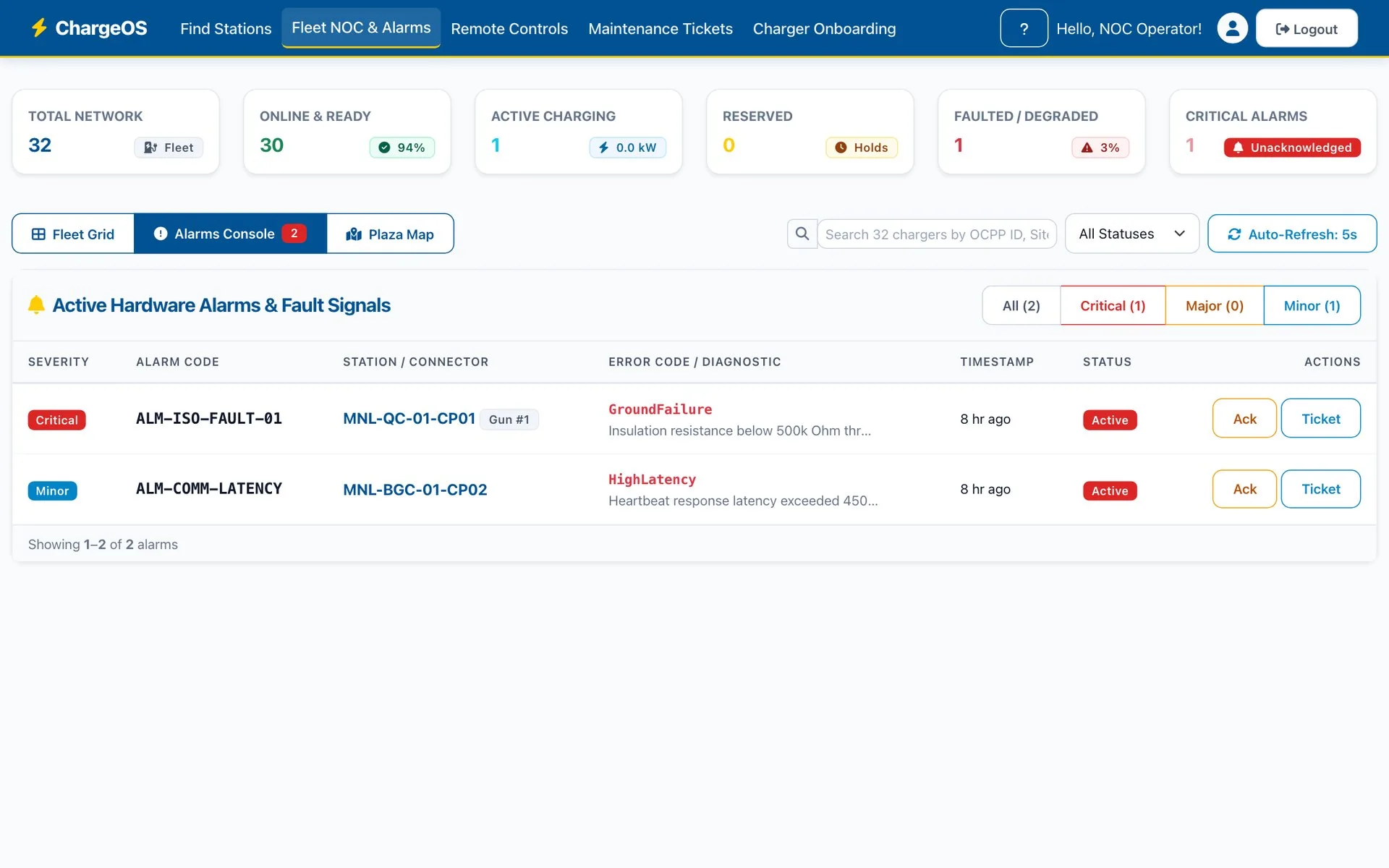
Faults arrive in order of severity. An operator acknowledges one, or turns it into a maintenance ticket in a click.
Remote commands
Start, stop, reset and unlock chargers remotely, with the charger’s own replies shown beside each command. Every remote command is recorded in the audit log.
Network map
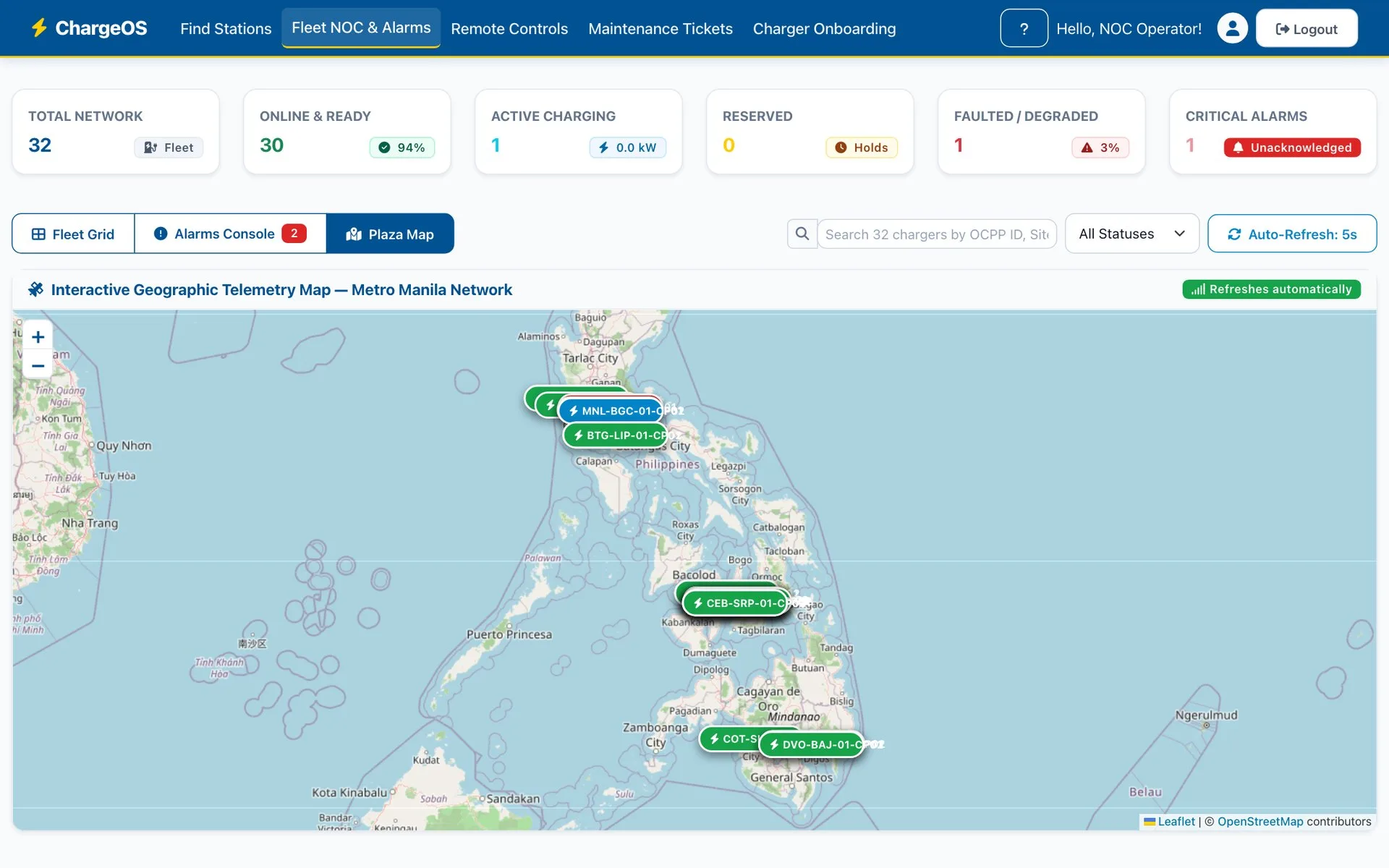
Every site on the map with live status, from a single plaza to the whole country.
Field maintenance
Work orders carry priority, target charger, technician and time to repair, from fault to resolution. Field technicians have their own sign-in, limited to tickets and telemetry.
Self-service charger onboarding
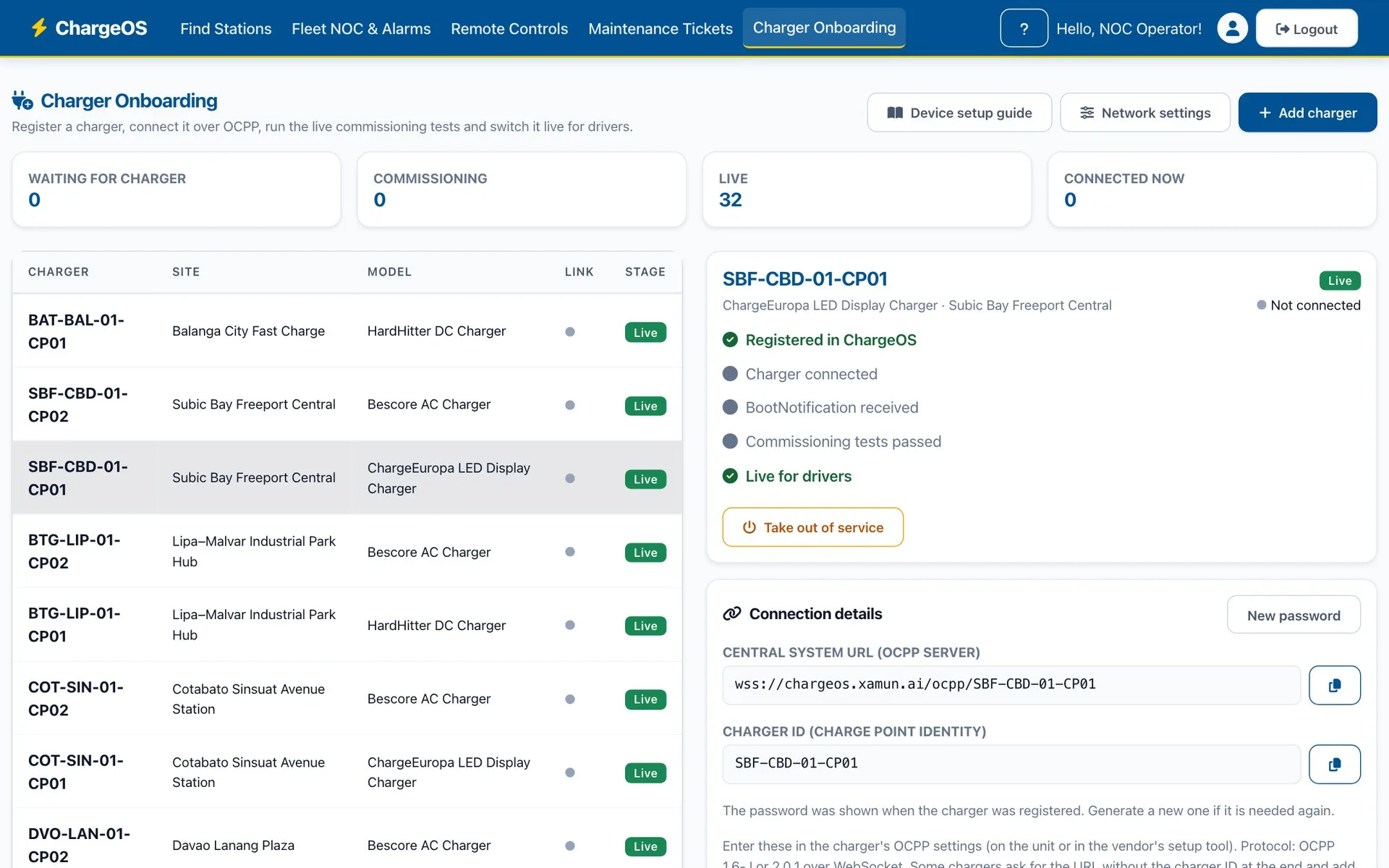
The operations team registers a charger, gets its connection details and runs live commissioning tests before drivers see it. A built-in device guide says what to set on the charger itself, in the words each vendor uses.
One platform. Any charger. Your team in control.
The operator’s side: the fleet screen, alarms and the network map, remote commands, charger onboarding, maintenance tickets, the dispute console, the ledger, the executive dashboard, tariffs and the permissions matrix. Recorded on the live demo you can open above.
What do support, finance and management get?
Behind every charger is a team answering customers and accounting for every peso. Each gets a workspace built for the job.
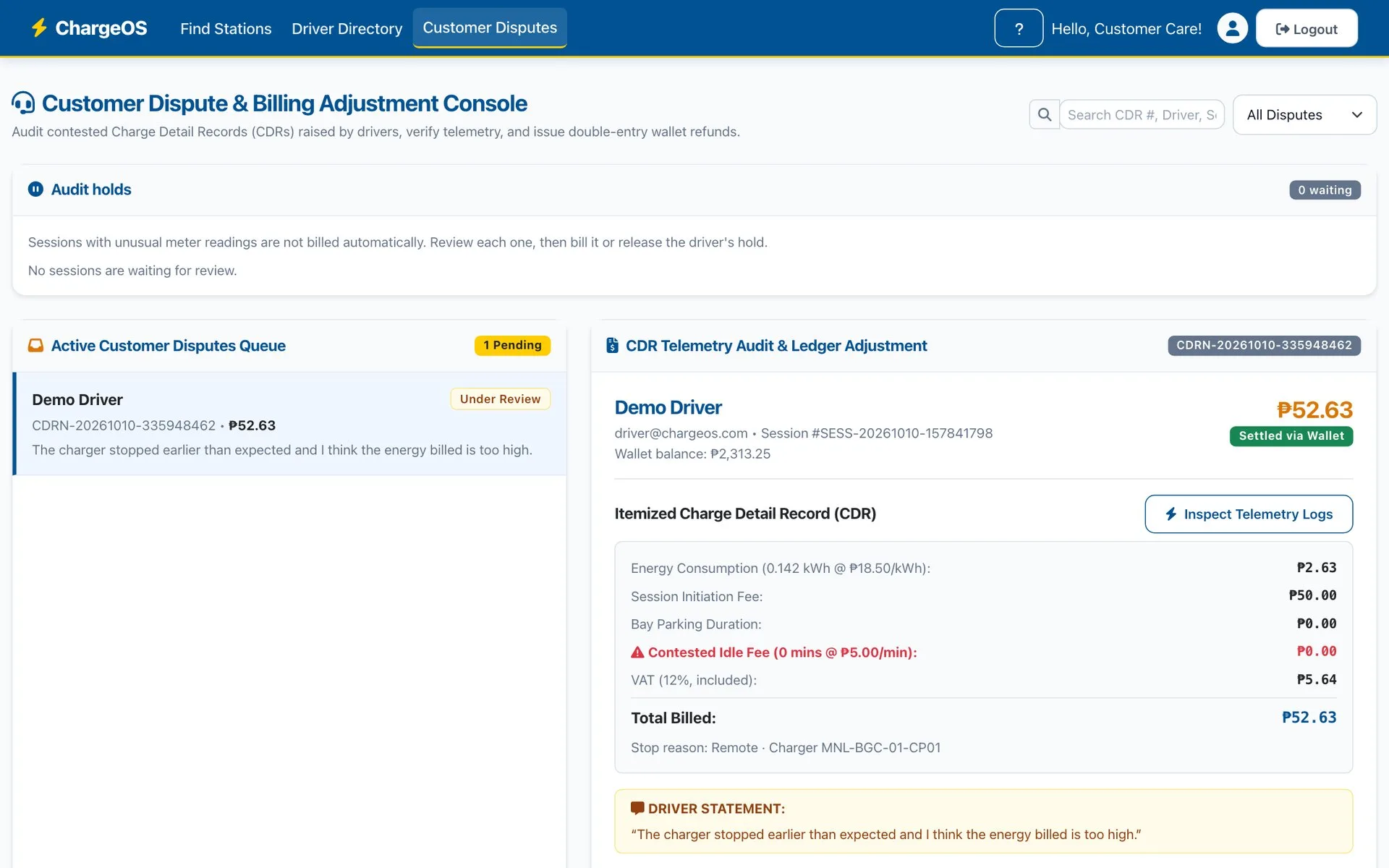
Disputes resolved with evidence
Each dispute opens the itemised bill, the meter readings and the driver’s own statement. Refunds post straight to the driver’s wallet and to the ledger. Sessions with unusual meter readings are held for review, not billed blindly.
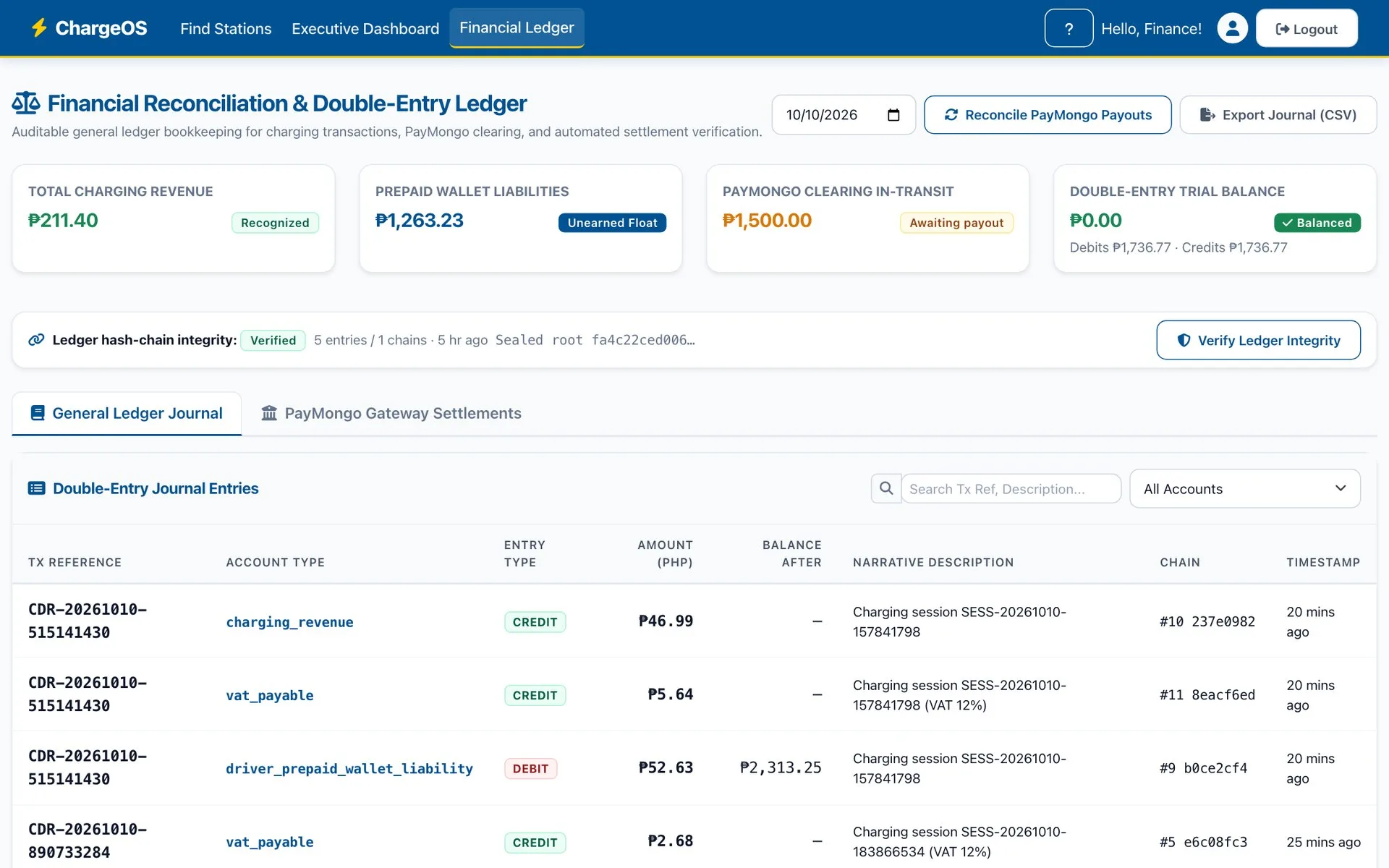
A ledger that balances itself
Every session, top-up, hold and refund posts balanced debits and credits. Entries are hash-chained and can be verified at any time. Gateway settlements are matched against the ledger, and the journal can be exported.
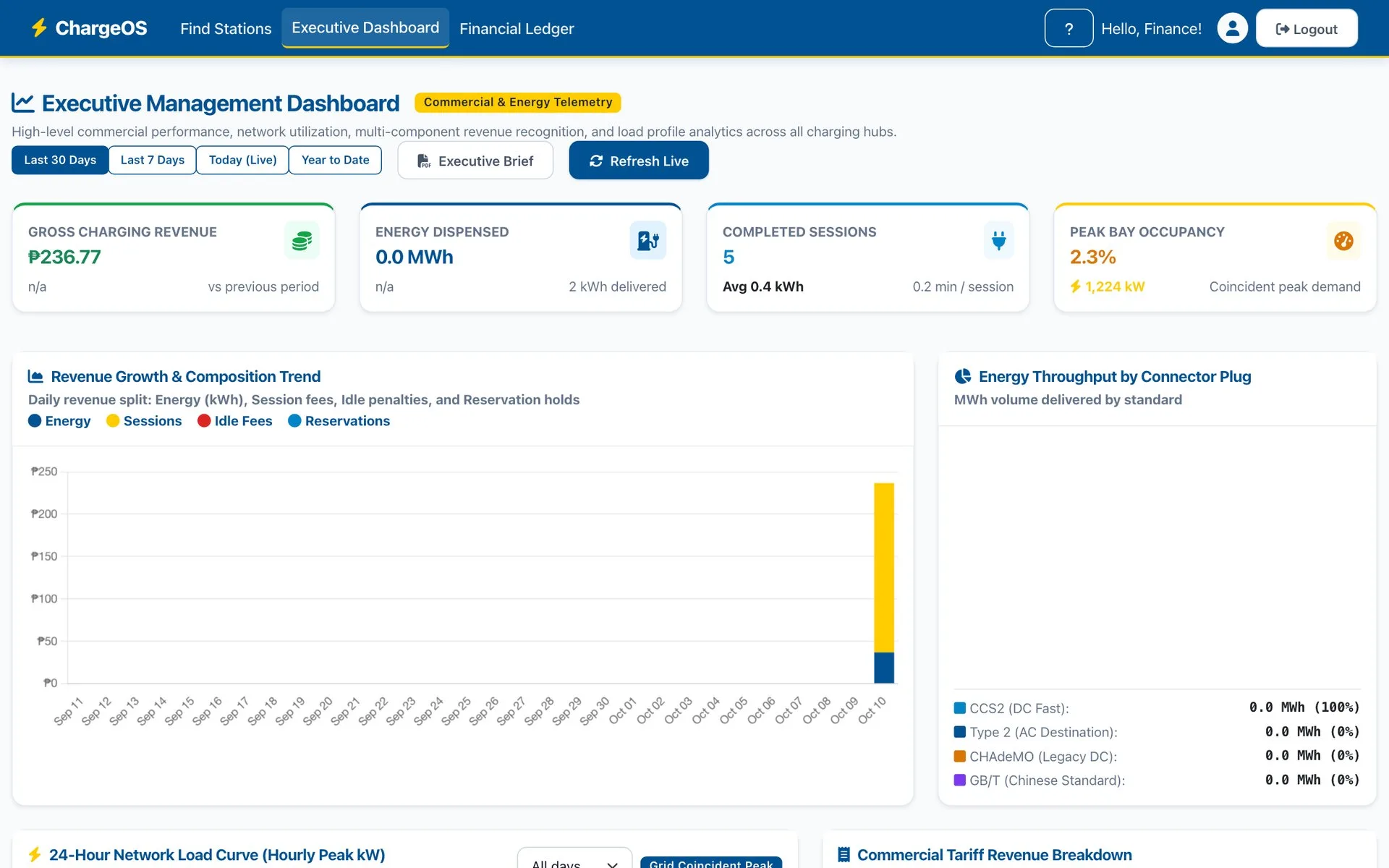
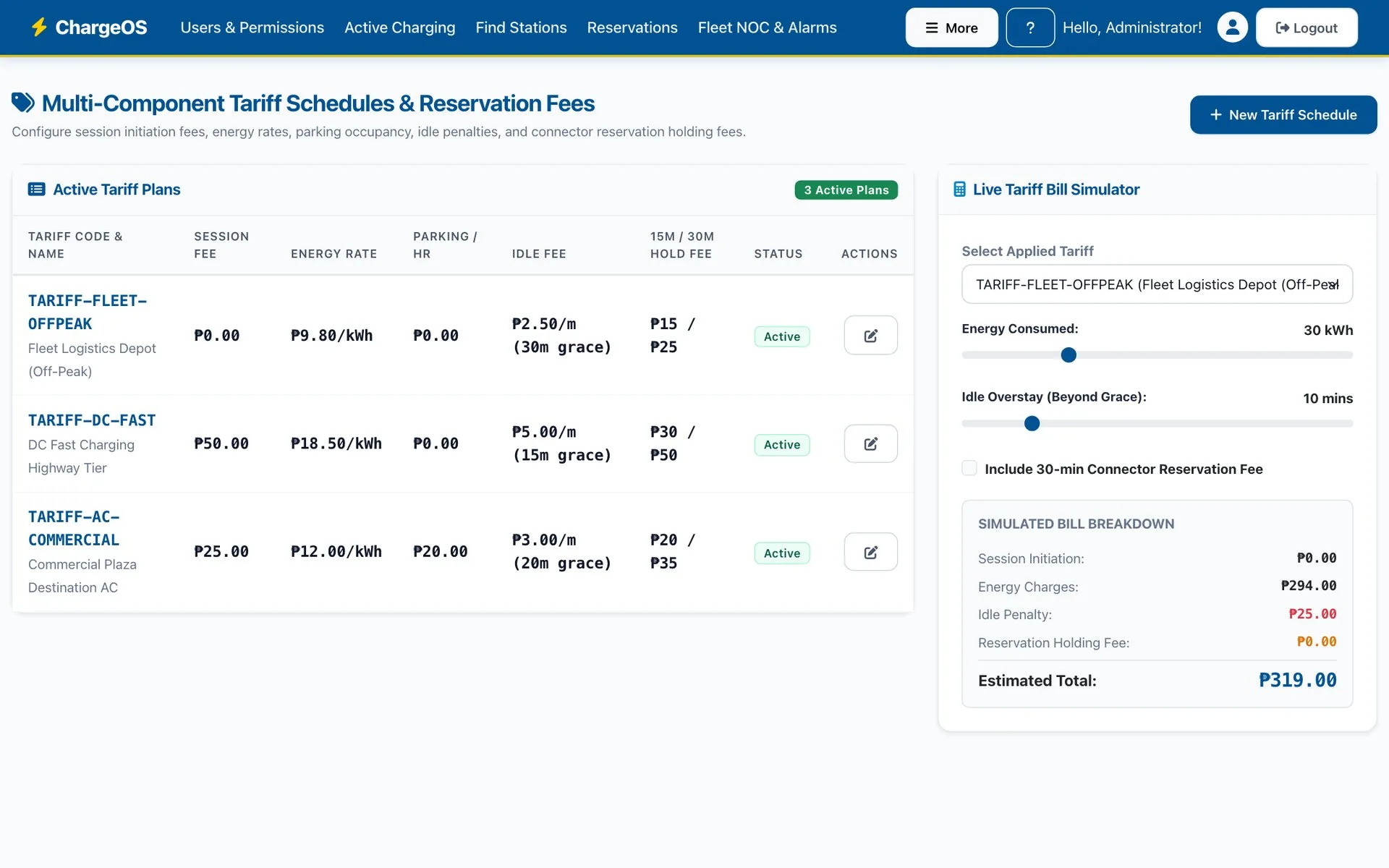
Executive view and pricing control
Revenue, energy delivered, sessions and bay occupancy, with trends by period and connector type. Session, energy, parking and idle fees are set per plan, and a bill can be previewed before a tariff is published.
Access control and hardware freedom
A permissions matrix decides what each role can see and do, enforced on every request. Charger vendors can be mixed freely: each model has a profile, a compatibility tier and its own test results.
Six advantages for the network owner
Two matter most: any charger, and the operator in control.
Vendor-neutral
Any OCPP 1.6-J or 2.0.1 charger, AC or DC, on one network.
Operator-run
Your own operations team onboards, tests and launches chargers without us.
Nothing to install
Drivers use it from the browser and can add it to the home screen.
Revenue you can audit
Every peso traced from meter reading to ledger entry.
Built for local payments
Wallet, GCash, Maya and cards through PayMongo, in pesos with VAT.
One source of truth
Operations, support and finance work from the same live data.
What does ChargeOS look like?
Real screens from the live demo you can open above. The demo network is new, so its figures are small; the dashboards fill from real sessions. Your own deployment is a separate instance, connected to your chargers.
Which standards and payment methods does ChargeOS support?
ChargeOS has its own OCPP central system, so it talks to chargers directly in the open protocol the industry already uses, rather than through one vendor’s cloud. Payments run in pesos through the methods drivers already have.
- OCPP 1.6-J
- OCPP 2.0.1
- AC and DC chargers
- QR start on every connector
- GCash
- Maya
- Cards through PayMongo
- Itemised VAT on every receipt
- Double-entry, hash-chained ledger
- Role-based access on every request
From demo to a live network
Three steps, starting with a hands-on session for your operations team on the demo environment.
Connect the first chargers
Register the first units and run the commissioning tests with your operations team.
Pilot at selected sites
Open a small set of stations to drivers and collect feedback.
Scale the network
Add sites, vendors and tariffs as the rollout grows.
Questions network owners ask
Which EV chargers does ChargeOS work with?
Any charger that speaks OCPP 1.6-J or OCPP 2.0.1, AC or DC, from any vendor. ChargeOS has its own OCPP central system built in. Each charger model has a profile, a compatibility tier and its own test results, so different vendors can run on one network.
Do drivers need to download an app?
No. The driver app runs in the phone’s browser and can be added to the home screen. Drivers scan the QR code on a connector to open the right charger. Guests can also charge without an account through walk-up checkout.
How do drivers pay?
From a prepaid wallet topped up by GCash, Maya or card through PayMongo, in Philippine pesos. Auto-reload keeps the balance ready, and every receipt itemises energy, fees and VAT.
Can our own team add new chargers?
Yes. The network operations team registers a charger, gets its connection details, follows the built-in device guide for what to set on the charger, and runs 13 live commissioning tests before the charger is shown to drivers. No vendor or developer is involved.
How does ChargeOS handle a billing dispute?
Support opens the session’s itemised bill, the meter readings and the driver’s own statement in one console. A refund posts to the driver’s wallet and to the ledger. Sessions with unusual meter readings are held for review before they are billed.
How does finance trust the numbers?
Every session, top-up, hold and refund posts balanced debits and credits to a double-entry ledger, with revenue, VAT payable and wallet liabilities kept separate. Entries are hash-chained and can be verified at any time, and gateway settlements are matched against the ledger.
Who uses ChargeOS inside the operator?
Seven roles, each with its own workspace: driver, guest, network operations, field technician, customer support, finance and administrator. A permissions matrix decides what each role can see and do.
Is there a live demo?
Yes, at chargeos.xamun.ai. The demo network has thirty-two chargers across sites in the Philippines, on demo data with simulated chargers. Your own deployment is a separate instance connected to your chargers.
How do we start?
Connect the first chargers and run the commissioning tests with your operations team, pilot at a small set of sites, then add sites, vendors and tariffs as the rollout grows. Xamun offers a hands-on session with your operations team on the demo environment first.
Put your first chargers on ChargeOS
A hands-on session with your operations team on the demo environment, then your first units registered and through the commissioning tests.