
CreativeStudioOS — Build your show’s world once. Every shot stays inside it.
The private production layer for broadcasters and media groups. A brief, a rundown or an idea becomes finished, approved video — a single reel or a whole programme — with cast, sets, wardrobe and voices held consistent on whichever AI model does the job best today, inside your own cloud, in English and Arabic.
What is CreativeStudioOS?
The private production layer for broadcasters and media groups. A brief, a rundown or an idea becomes finished, approved video — a single reel or a whole programme — with cast, sets, wardrobe and voices held consistent on whichever AI model does the job best today, inside your own cloud, in English and Arabic.
Every media group now needs more video than its crews can shoot
More outlets
Broadcast, streaming and social verticals, each with its own format, length and cadence.
More languages
Arabic and English at a minimum, each needing its own voice, script direction and on-screen text.
Same standards
Brand, editorial sign-off, rights and likeness consent still apply to every frame.
Today’s options each give something up
Public AI suites
Your brief, brand assets and unreleased footage leave the building.
Self-built node graphs
They generate beautifully, but know nothing about workflow, review or sign-off.
Direct vendor APIs
The whole pipeline is tied to one provider’s roadmap and price list.
Most teams choose between privacy, workflow and freedom. CreativeStudioOS is built so they don’t have to.
Your world is the asset. The model is replaceable.
Define a show’s cast, sets, wardrobe and voices once, in a Closed World Bible. CreativeStudioOS holds every shot to it — on the best model available today, and on whichever one leads tomorrow.
Four layers, one clean seam
| L1 · Creative experience | 30+ studio screens, in English and Arabic with full right-to-left. |
| L2 · Workflow and orchestration | Reels, episodes, workflows, approvals, routing, cost and audit. |
| L3 · Model connectors | Swap here and nothing above changes: Google, OpenAI, fal, BytePlus or your own GPU. |
| L4 · Your infrastructure | Your cloud, your GPUs, your storage, your identity provider. |
From single reels to whole programmes
CreativeStudioOS started as a reel generator: one brief, one finished reel. It now produces entire programmes, with the cost control, sign-off and delivery files a broadcaster needs before anything airs.
Episodes
A rundown, a brief or an idea becomes a whole programme, produced segment by segment.
Costed approvals
An estimate before any spend, a budget guard, and approval policies you configure.
Assembly and delivery
A broadcast master, timing sheet, captions and stems, with loudness to EBU R128.
Release sign-off
A four-section checklist with live evidence. The master that is signed is frozen.
Production-grade reliability
A 64-point adversarial audit, closed in four waves: restart recovery, retries, limits.
Clearer for every role
Genuine read-only viewers, notifications per workspace, and work never lost on navigation.
A whole programme, produced line by line
Mixed programmes are first-class. Real-footage slots take uploaded packages; live segments hold a timed slate, so the running order and timings stay true from the first draft to the final master.
Start
Script-first, idea-first or world-first
Breakdown
Each line typed as generated, real footage or live, with timings
Estimate and approval
Cost shown up front; spend approved before any render
Segment reels
Each generated line becomes its own reviewed reel
Assembly
Approved segments, footage and live slots cut into one master
Release
Sectioned sign-off on the exact master that airs
Three entry points, one production spine
Script-first
Import the rundown you already write: paste it, or upload Word, PDF, Excel, CSV or text. Each line is matched against the locked world; unknown cast is flagged, never invented.
Idea-first
A brief or a one-line idea is planned into a first running order, with segment types and timings, for the team to shape.
World-first
Build the Closed World Bible first — cast, sets, voices, show package — then produce reels and episodes inside it.
All three meet in the same breakdown, then the same costing, approvals, segment reels, assembly and release. Verbatim lines are guarded on every script path, so what a presenter must say is never rewritten.
You see the cost before anything is spent
| Estimate first | A single-pass estimate at the episode’s own resolution, per segment and in total. |
| Spend approval | Rendering starts only after the spend is approved, and the approved amount is locked in. |
| Budget guard | Re-approval can raise a budget but never quietly lower one; overspend is refused. |
| Pause means stop | Pausing an episode withdraws queued renders and retries, not just new ones. |
| Paced submissions | Segments start a few at a time, so one episode cannot flood a provider. |
Approval policies that match how your newsroom signs off
Your rules
Steps where any one, or all, approvers must agree; sectioned steps for specialist sign-off.
Separation of duties
The person who submits cannot approve their own request.
Delegation
Approvers can delegate while away; the record shows who acted for whom.
Deadlines
SLA reminders and stall alerts keep requests moving.
Never stuck
If no eligible approver exists, the right people are alerted at once.
Frozen at submit
The policy in force when a request is made is the one it is judged by.
One click from approved segments to a broadcast master
Preview or final
A preview any time, with slates for unfinished lines; the final once every segment is ready.
Show package
Open, close and stings from the show package, placed on the running order.
Loudness on spec
The master is levelled to EBU R128 (−23 LUFS, −1 dBTP), stated rather than assumed.
Timing sheet
Frame-exact timecodes for every line, as a spreadsheet-safe CSV.
Captions from the script
SRT and VTT built from the approved words, not transcribed.
Stems
Dialogue, music, effects and M&E — the tracks a facility asks for to dub.
The master that is signed is the master that airs
Characters and world
Closed-world findings, undeclared people, and real footage flagged for a human check.
Video
Format, resolution and frame rate against the episode spec.
Audio
Loudness, and the final master present and current.
Final release
A named approver releases the episode.
- Evidence is computed live from the production, so the checklist cannot drift from what was made.
- During sign-off the episode is frozen: every edit to its segments is refused until the request is withdrawn.
- Any change to the cut makes the master stale, and a stale master blocks every signature.
Hardened by an adversarial audit before clients lean on it
findings across feature, function and stability
fix waves, each reviewed and tested
paid renders repeated after a restart
- Restart-safe: interrupted storyboards, clips and approvals resume or are recovered, never paid for twice.
- A failed shot can be retried on its own, with an edited prompt if needed.
- Provider throttling is absorbed with bounded retries; uploads are streamed and size-checked.
- Viewers get a genuine read-only mode; notifications stay inside their own workspace.
Define the world once. Nothing outside it appears.
Most AI video tools cast a character from a description, and a description does not hold a face. CreativeStudioOS casts from the show’s own world and holds every shot to it — then proves it, shot by shot.
Cast
Presenters and characters, from one photo or a trained look, each with wardrobe and kit.
Sets
The show’s locations, defined once and reused in every shot that needs them.
Voices
A voice per character, and a pronunciation lexicon for names and places.
Show package
Open, close, ident and music bed, applied to every cut.
Closed
Anyone or anything not declared is kept out of every shot.
Portable
The bible belongs to the platform, not the model. Change model and it carries over unchanged.
Enforced on every shot, and measured rather than claimed
Checked before an editor sees it
Every shot is checked for extra people, missing cast and frozen motion. A shot that breaks the world fails quality control and is retaken with the world unchanged.
Confirmed by an editor
An editor confirms or dismisses each finding, so the record rests on human judgement, not on the checker’s own opinion of itself.
Scored per model
Each model’s record of staying inside a closed world is scored from those confirmed findings, and routing follows the score.
Replayed on every change
Real productions are replayed in an automated harness on every change to the platform, at zero spend.
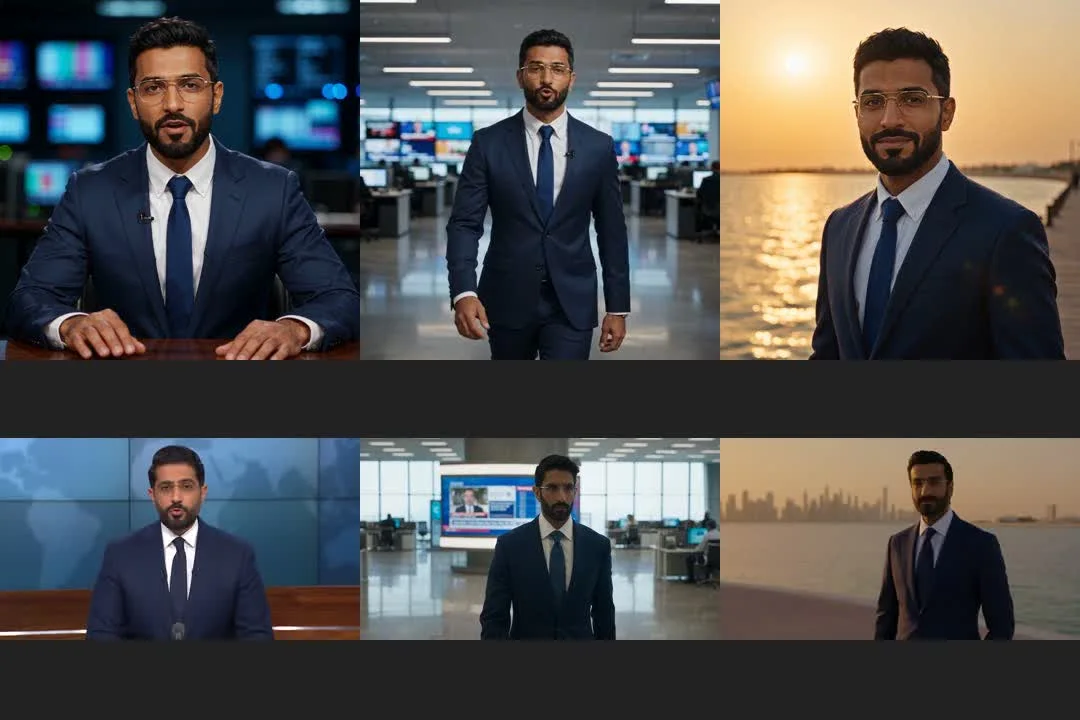
A reference holds the face. Words don’t.
The same prompts and settings, run twice. With one reference sheet, the presenter is the same man at the desk, walking the newsroom and outdoors. With a description only, he is three different men — which is how most AI video tools cast a character.
From brief to broadcast
One brief becomes a finished, narrated reel in six stages. An editor reviews and approves each stage before the next one runs, and every episode segment uses the same pipeline.
- Brief: title, concept, tone, length
- Script and narration
- Storyboard and shot list
- Footage: AI, studio shoot or stock
- Voiceover and music bed
- Graphics, captions and assembly
Swap the model, keep the pipeline
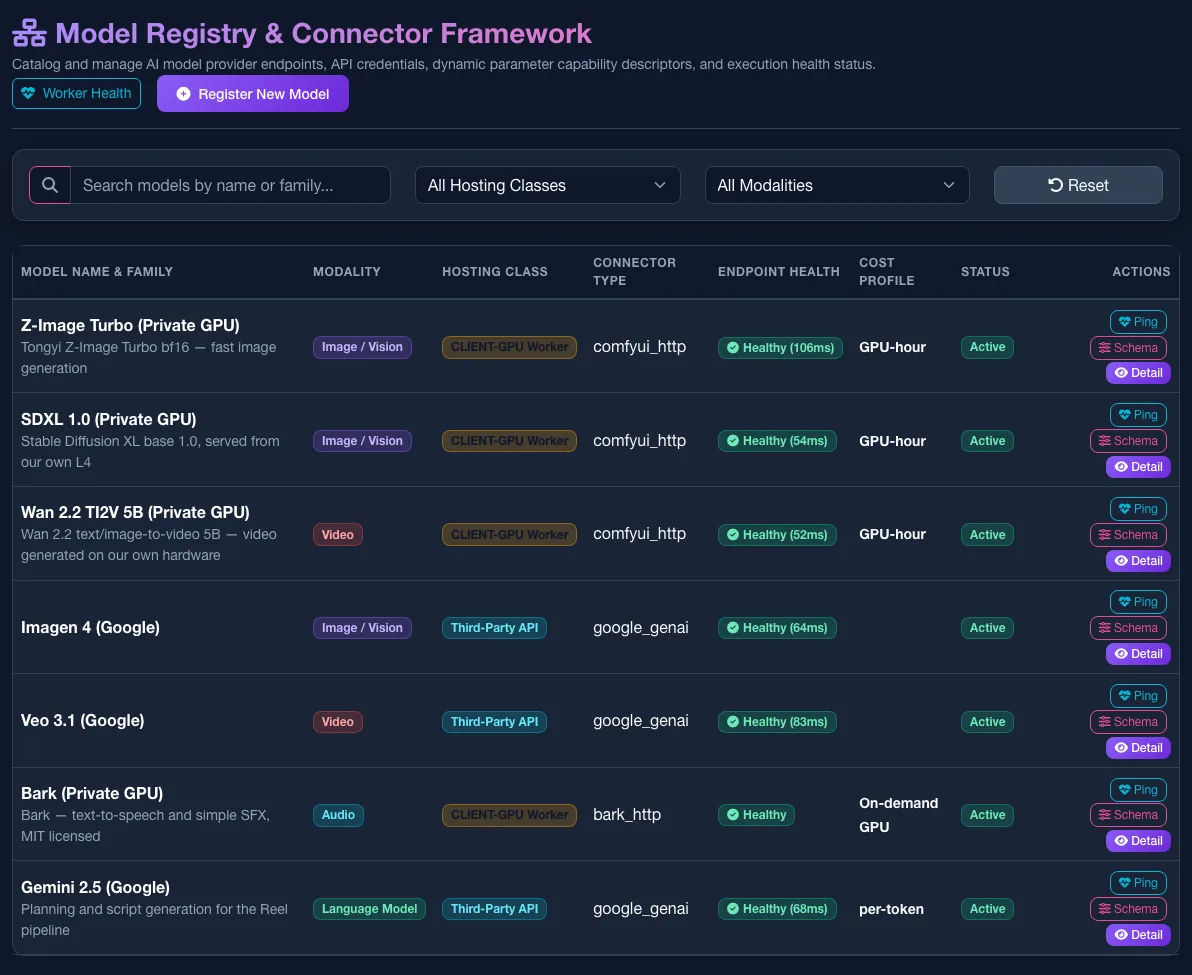
Today the best engine for character work is ByteDance Seedance 2.5, switched on per workspace, by choice, with real presenters admitted only through BytePlus likeness authorisation tied to your consent register. Tomorrow’s can be anything: the bible, the checks and the routing belong to the platform, not the model.
| Register | Add any endpoint through a wizard. |
| Route | Choose which model serves which job, with fallbacks. |
| Compare | The same prompt on several models, side by side. |
| Promote | Make the winner the default. No code, no redeploy. |
Everything a producer reaches for, in one place
Characters
One home per character — reference portraits, wardrobe, kit and voice — picked straight into a bible’s cast.
Speech with lip-sync
Lines are spoken with matching mouth movement, and names are said the way the show’s lexicon says them.
Music beds
Generated music beds are mixed under the voice for every cut, from the show package.
Stock in the library
Pexels and Unsplash searched inside the product, with the keys held in the encrypted vault.
Workflows
A visual workflow builder for repeatable pipelines.
Downloads
In any size the asset can honestly produce.
Nothing leaves the building unless you allow it
Your environment
The whole platform runs in your cloud or data centre. No managed AI service is required.
Egress by workspace
Keep a workspace on private GPUs only, or allow a named hosted model such as Seedance.
Encrypted secrets
Provider keys are stored encrypted (AES-256-GCM) and never baked into images.
Workspace isolation
Every query is scoped to a workspace, so desks, brands and channels stay apart.
Licence-vetted models
Shippable paths use commercially licensed weights; known non-commercial traps are avoided.
API-first
Everything in the interface is available over REST and webhooks, with documented OpenAPI.
Nothing airs without a named human decision
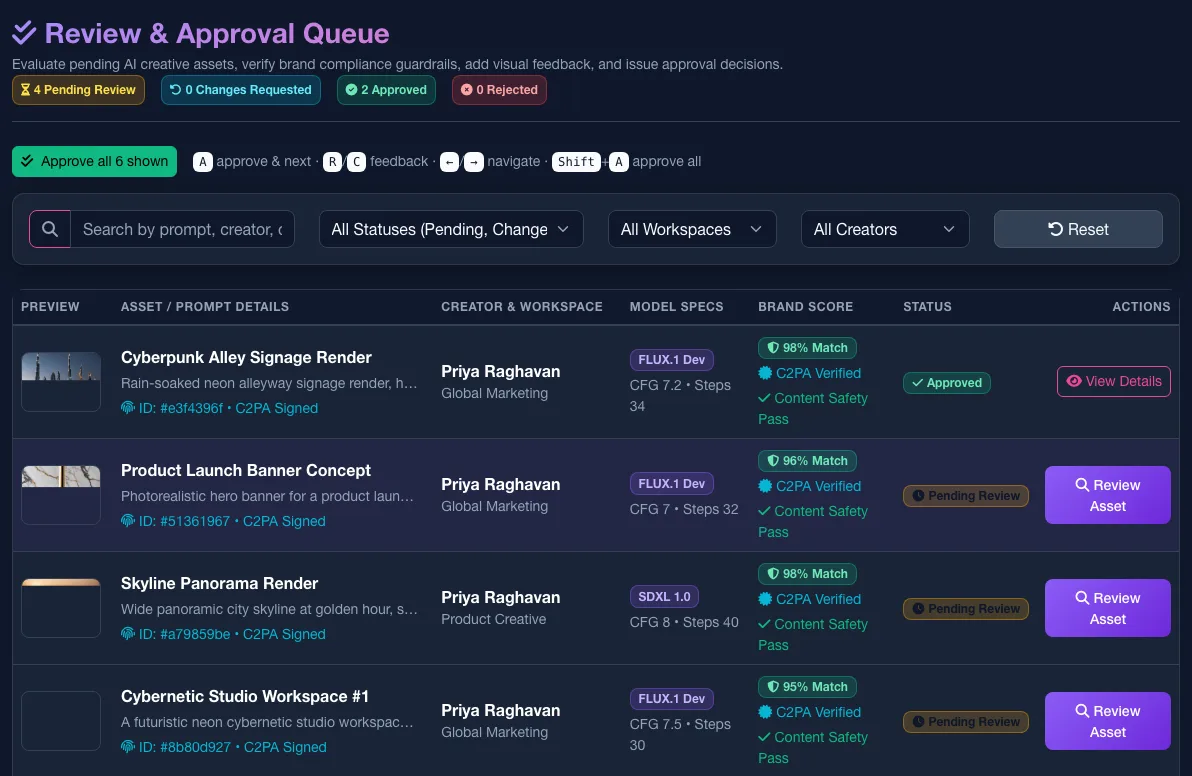
- A review queue: each asset arrives with a brand-match score and a content-safety result.
- Full lineage: which model, settings, brief and presenter made every asset.
- A tamper-evident audit trail, hash-chained and exportable.
- Consent-gated likeness: real people only from approved, consented identities.
- Role-gated approvals, multi-factor sign-in, and C2PA content credentials.
An agent that drives the production and cannot approve its own work
- Talk to it and it runs the same stages an editor would.
- It proposes by default, and spends only within a set budget.
- No approve or publish tool exists for it, in any mode.
Own GPUs without paying for idle ones
a month for a GPU worker on wake-on-demand when idle
a month for the same GPU left running around the clock
spend by model, workspace and user, plus quotas checked before a job runs
Measured on the pilot’s NVIDIA L4 GPU worker on Google Cloud. Your rates will vary with cloud and region.
What it can and cannot do, today
Stated with confidence, including the limits.
- Whole episodes from a rundown, brief or idea
- Costed spend approval and approval policies
- Broadcast master, captions, stems and timing sheet
- Release checklist with live evidence
- Consistent sets across a production
- Undeclared people kept out; shots with extras fail
- Lip-synced speech and a pronunciation lexicon
- Hold a character’s face from a painted reference sheet
- Keep four characters distinct in one shot
- Hold identity through a 15-second shot
- Carry set, light and wardrobe on from the previous shot
- A real presenter’s face before likeness authorisation
- A character’s own recorded voice (under test)
- More than four characters held in one shot
- Speech in a chosen Arabic dialect
How it compares
| CreativeStudioOS | Public AI suites | Node graphs | Vendor APIs | |
|---|---|---|---|---|
| Closed-world continuity | Yes | Partly | No | No |
| Whole-episode production | Yes | No | No | No |
| Runs in your environment | Yes | No | Yes | No |
| Uses your own models | Yes | No | Yes | No |
| Costed approvals and release sign-off | Yes | Partly | No | No |
| Audit and provenance | Yes | Partly | No | No |
| Switch providers freely | Yes | No | With effort | No |
A general comparison of categories, not of named products.
Running today in a live broadcaster pilot
of the client’s requirement areas live in the pilot
automated tests on the platform’s backend
model providers wired in, including a private GPU
languages end to end: English and Arabic
What does CreativeStudioOS look like?
Real screens from the platform, on demo data. Your own deployment is a separate instance, in your cloud, connected to your models.
Questions broadcasters ask
Who is CreativeStudioOS for?
Broadcasters and media groups that need more video than their crews can shoot — for broadcast, streaming and social, in more than one language — without giving up brand control, editorial sign-off, rights or likeness consent.
How does CreativeStudioOS keep characters consistent across AI video shots?
Each show has a Closed World Bible: its cast, sets, wardrobe, voices and show package are defined once and every shot is held to it. Anyone not declared is kept out; a shot with an extra person, missing cast or frozen motion fails quality control before an editor sees it and is retaken with the world unchanged. Characters are cast from a reference, not from a description: in a like-for-like test on 25 September 2026, one reference sheet held the same face across three scenes, while a description alone produced three different men.
Can CreativeStudioOS produce a whole episode, not just a clip?
Yes. Import a rundown (pasted, or as Word, PDF, Excel, CSV or text), start from a brief or a one-line idea, or start from the world. Each line is typed as generated, real footage or live, with timings; the cost is estimated and approved before anything renders; each generated line becomes its own reviewed reel; and approved segments, footage and live slots are cut into one master. Lines a presenter must say verbatim are never rewritten.
Does it run in our own cloud, on our own GPUs?
Yes. The whole platform runs in your cloud or data centre and no managed AI service is required. Each workspace can be kept on private GPUs only, or allowed to use a named hosted model. On the pilot, a GPU worker that wakes on demand costs about $25 a month when idle, against about $520 a month for the same GPU left running.
Which AI models does CreativeStudioOS use?
Whichever does the job best. Google, OpenAI, fal, BytePlus and your own GPUs are connected today, and any endpoint can be added through a wizard, routed to a job with fallbacks, compared side by side and promoted to default without code or a redeploy. Today the best engine for character work is ByteDance Seedance 2.5; when another model does it better, routing prefers it and your bibles carry over unchanged.
Does CreativeStudioOS support Arabic?
Yes, end to end: 30+ studio screens in English and Arabic with full right-to-left, and scripts, voices and on-screen text in both languages. Speech in a chosen Arabic dialect is not yet available.
How is spending on AI video generation controlled?
An episode is estimated at its own resolution, per segment and in total, before anything is spent. Rendering starts only after the spend is approved, and the approved amount is locked; re-approval can raise a budget but never quietly lower one, and overspend is refused. Pausing an episode withdraws queued renders and retries. Spend is reported by model, workspace and user, with quotas checked before a job runs.
What does CreativeStudioOS deliver at the end?
A broadcast master levelled to EBU R128 (−23 LUFS, −1 dBTP); a frame-exact timing sheet as CSV; SRT and VTT captions built from the approved script rather than transcribed; and dialogue, music, effects and M&E stems for dubbing. The release checklist signs off that exact master; any later change to the cut makes it stale and blocks every signature.
Can the AI approve or publish its own work?
No. The AI co-producer runs the same stages an editor would and proposes by default, spending only within a set budget, but no approve or publish tool exists for it in any mode. Nothing airs without a named human decision, and the person who submits a request cannot approve it.
Can it use a real presenter’s face?
Only with consent. Real presenters come in through likeness authorisation tied to your consent register, and only approved, consented identities can be used. Before that authorisation is in place, a real presenter’s face is not available.
How do we start?
With a walkthrough: bring one real rundown or brief and we produce it live in the demo environment. A pilot follows, deployed in your cloud and connected to your models with named users for each role, and then a rollout on Kubernetes with single sign-on, object storage and more desks.
Three steps to your own studio
Walkthrough
Bring one real rundown or brief. We produce it live in the demo environment.
Pilot
Deployed in your cloud and connected to your models, with named users for each role.
Rollout
Scale out on Kubernetes, connect single sign-on and object storage, and add desks.
Bring one rundown. Leave with an episode made on your models.
A live walkthrough on your own rundown or brief, then a pilot deployed in your cloud, connected to your models, with named users for each role.